The ABCs of Web Development
Web development can often be an utterly perplexing affair. Today, aimed
at beginners, I’d like to introduce you to twenty six concepts or
technologies, each mapping to a letter of the alphabet. Sounds wonky? It
probably is! Let’s get started after the jump.
-->
A — AJAX
AJAX stands for Asynchronous
JavaScript And XML and is the main driving force behind all these super
smooth web applications you’ve been using over the past few years.
AJAX,
as a technology, has been pretty much all pervasive. GMail? Check.
Flickr? Check. eBay? Check. You can even find it in WordPress’
administration panel. So what exactly does it do and how does it do it?
At the center of everything is the XMLHttpRequest which allows calls to be sent and received,
after
a page has been fully rendered without touching the rest of the page.
This essentially means that a web application doesn’t have to go through
the a full page refresh for each and every action. This, in turn,
provides a much smoother, much immersive, desktop like user experience.
B — Browser
A browser is the understated
structure on which you frame your magnificent masterpieces, be it
websites or applications. They aren’t limited to retrieving websites
though — modern web browsers are quite the multitasking beasts. My
installation, for example, taps into IRC, FTPs into my development
servers and syncs my credentials across every device I use.
As you
may have surmised, browsers are simultaneously the cause of much cheer
and rage to the modern web developer – they’re invaluable tools as well
as annoying beasts. Any developer who has to make sure that his work has
to look
perfect in
every browser will know the pain.
C — CSS
CSS is one prong of the front end
development trident. CSS, which stands for Cascading Style Sheets, is
the language with which you define how a page is displayed — its
presentation, if you will.
During the horror days of web
development, developers would frequently weave the presentation code
into their source. CSS, amongst other technologies, alleviated this
greatly by providing a method to cleave presentation from the content.
D — DOM
The DOM, an abbreviation of Document
Object Model, is the accepted convention for interacting with HTML [or
XML] documents. The DOM API provides a way to traverse and manipulate a
document programmatically.
E — Events
Modern web applications are deeply
event driven affairs. But what’s an event? Most things you do on a web
page constitute an event. The trepidatious hover over a funny but
possibly NSFW link, clicking on a button, pressing tab to move to the
next text field are all valid events.
Event handling refers to the
process where we attach a specific chunk of code to be run whenever a
certain event is fired. Again, this is one of those fundamental concepts
behind modern web development that you’ll need to master.
F — Firebug
Any craftsman needs his tools to
work efficiently. Web developers aren’t deviants from this rule. One of
the most robust tools around is Firebug.
Firebug
is a Firefox extension that will galvanize your workflow. It lets you
edit and monitor a page’s every aspect on the fly. I can’t quite explain
all the features it provides so make sure to hit the links below.
G — Grid
Grids are the visual frameworks on
which pages are structured. Ported over from the once burgeoning print
industry, grids are an essential part of the modern web development
workflow.
There are a number of CSS frameworks catering to exactly
this need since building a grid based layout, for a non-trivial number
of pages and layouts, can be an exercise in masochism.
H — HTML
If you’re reading this today, you
probably already have a vague idea as to what this is. If you got
tricked into this link though, read on. By the way, welcome to Nettuts!
We write about web development, cookies and Justin Bieber.
HTML
stands for HyperText Markup Language, the defacto markup language of the
web — it’s to web pages as bricks are to homes. HTML consists of
several components or elements — tags, tag attributes and the content
enclosed within the tags.
The latest version of the HTML standard,
HTML5, is now upon us bringing a number of new features, streamlining
the workflow and fixing a few incompatibilities.
I — IE
Ahh, Internet Explorer. The name evokes
both awe and anger. Once a hero which brought forth impressive new
features to the market, single handedly moving the industry forward, it
also dropped the ball by letting the browser stagnate. Till date, it’s
also the leading cause of alopecia in front ends developers. After a
decade of battering, the latest version of Internet Explorer, 9, is once
again in the right path towards innovation.
Whatever your stance towards Internet Explorer is, it’s an intrinsic and inextricable part of the web development process.
J — JavaScript
JavaScript is the final member
of the essential web development trio. JavaScript, which is NOT Java, is
the scripting language of the web. Its use in billions of web pages
and, more importantly, web sites stakes that claim. You define behavior
through JavaScript — managing events, manipulating the DOM and talking
to the server.
Thanks to the incredible adoption of libraries,
like jQuery, awareness and knowledge of JavaScript has been growing
every year, year after year. I think it’s appropriate to say that
JavaScript is an absolute must for every modern web developer.
K — Keyword Optimization
SEO relates only
tangentially to web development but even then, it’s important for a web
developer to have basic knowledge of what SEO is and what it does.
Keyword
optimization refers to the process of choosing the correct keywords for
your website and then optimizing them so your audience can find your
site. While you’re dabbling with all the tenets of SEO, remember this:
content is king.
If you have bad content with excellent SEO, users will find you but
leave soon after. If you have good content, users will find you and stay
L — Less
Less is a stylesheet language with a few aces up its sleeves. Their website states that
LESS extends CSS with dynamic behavior such as variables, mixins, operations and functions and I’m inclined to agree.
LESS
is CSS on anabolic steroids. Yes, it sounded better in my head but you
know what it means. It brings the concepts of a dynamic language to CSS
thereby making humongous stylesheets a lot more easier to manage.
M — MVC
The Model View Controller pattern,
better known as MVC, is one of the most used in the web development
world. It’s an architectural pattern that separates each part of a web
application into logical chunks for better maintainability — models
handle data, views handle presentation while the controller coordinates
the flow of information between the two.
If you’ve used a modern
web development framework, you’ve used MVC. Ruby on Rails, Code Igniter
and Zend Framework all use this pattern.
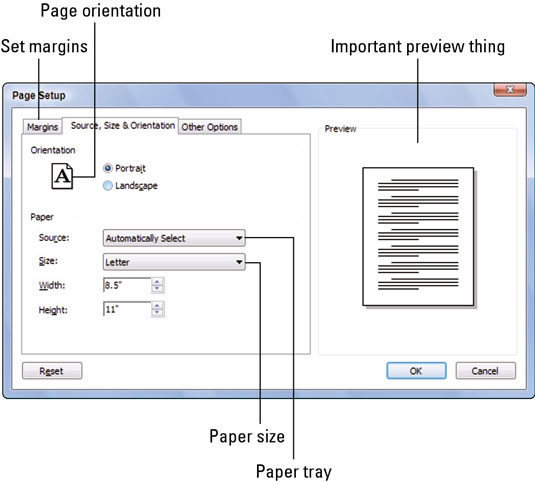 To access the Page Setup dialog box, choose the File→Page Setup command. In certain newer Windows programs,
the Page Setup command may be found on the File tab, which is the
leftmost tab above the toolbar. The Page Setup command may be on the
Print or Publish submenu on the File tab.
To access the Page Setup dialog box, choose the File→Page Setup command. In certain newer Windows programs,
the Page Setup command may be found on the File tab, which is the
leftmost tab above the toolbar. The Page Setup command may be on the
Print or Publish submenu on the File tab.

 Latest
computer provides high speed dispensation, great presentation,
effortless multitasking and a theatrical increase in your output. Get
the most out of it with a new PC. Today’s desktops and notebook present
greater performance, quality and dependability than ever previous to.
These computers have 2X faster presentation, less waiting, sleek design
and keep you productive, entertained and knowledgeable. New technology
gives you the presentation you require in the design you desire. Let’s
take a look on Next Generation computer.
Latest
computer provides high speed dispensation, great presentation,
effortless multitasking and a theatrical increase in your output. Get
the most out of it with a new PC. Today’s desktops and notebook present
greater performance, quality and dependability than ever previous to.
These computers have 2X faster presentation, less waiting, sleek design
and keep you productive, entertained and knowledgeable. New technology
gives you the presentation you require in the design you desire. Let’s
take a look on Next Generation computer.


 Back to top

 Hewlett
Packard (HP) has lauched a new server rack that is the answer for
cost-saving while still having capability to provide the whole weight
support for 2,000 pounds of equipment.
Hewlett
Packard (HP) has lauched a new server rack that is the answer for
cost-saving while still having capability to provide the whole weight
support for 2,000 pounds of equipment.

 Computer Ports and Connectors: A Quick Reference


